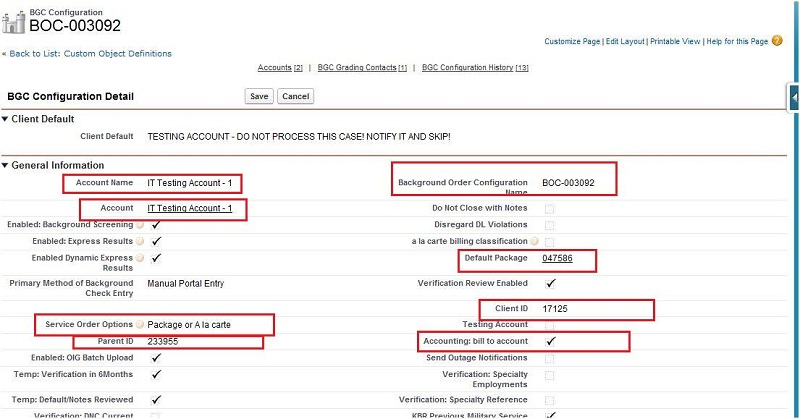
About BGC configuration object:
BGC configuration object used to hold all the various types of special configurations for a client.
BGC configuration object is account's child object where all the setting and information get saved for particular account.
Why BGC configuration object is in pre-employ?
In pre-employ, information about client's first name, last name, SSN, shipping address and other information will be saved in BGC configuration object's field.
Relation of 'Account' and 'BGC configuration' object?
In pre-employ, BGC configuration object is a child of account standard object.
BGC configuration and account have one to one relation and both object have their lookup fields in each other.
How to reach BGC configuration object and its fields?
There are mainly two ways to reach out BGC configuration object and its fields.
1: With the help of 'Quick setup' search box.
2. With the help of 'All tab' button.
1: With the help of 'Quick setup' search box.
Step 1 : Click on the user name(Right corner of the screen).
Step 2 : Select setup
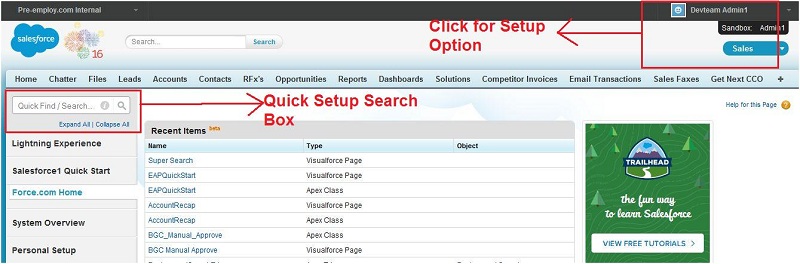
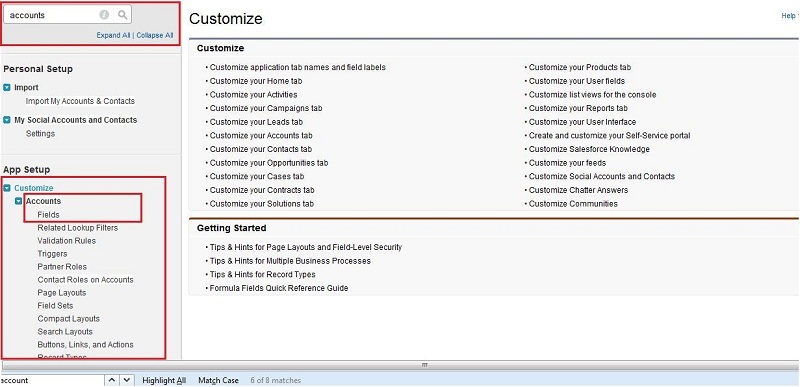
Step 3 : Write 'account' in quick setup box.
Step 4 : Under customize tab click on accounts fields.
Step 5 : Search for BGC configuration and click on BGC configuration field.
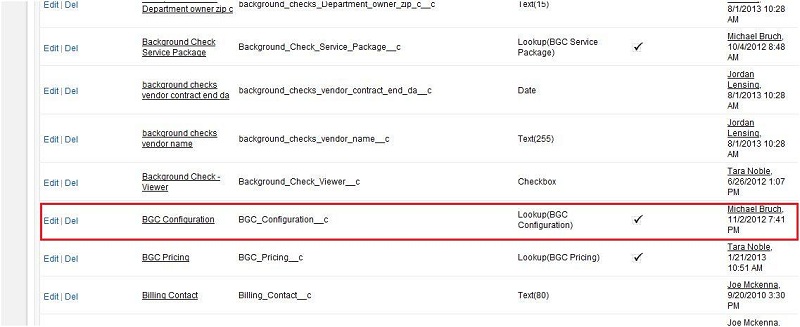
Step 6 : All the BGC configuration object fields will be on this page.
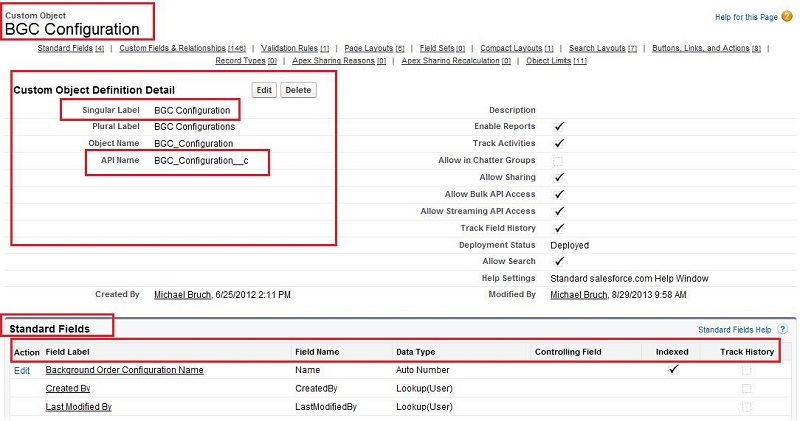
2. With the help of 'All tab' button.
Step 1 : Click on all tab button on the home page of salesforce.
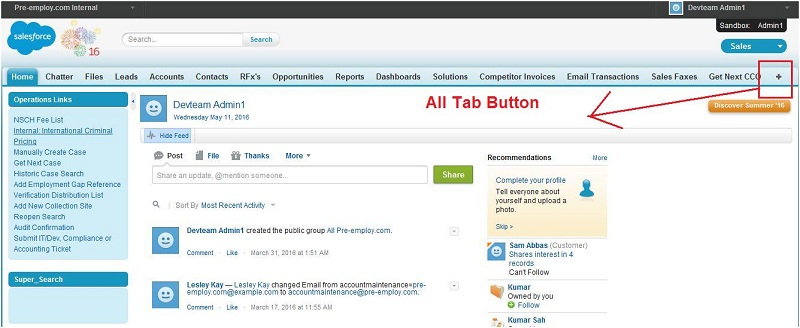
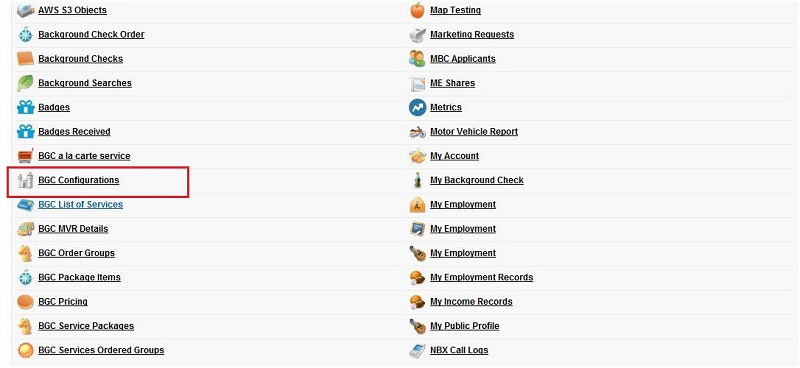
Step 2 : Search for BGC configuration and click on BGC configuration.
Step 3 : Click on the right side of quick button(Force.com) and select view fields.
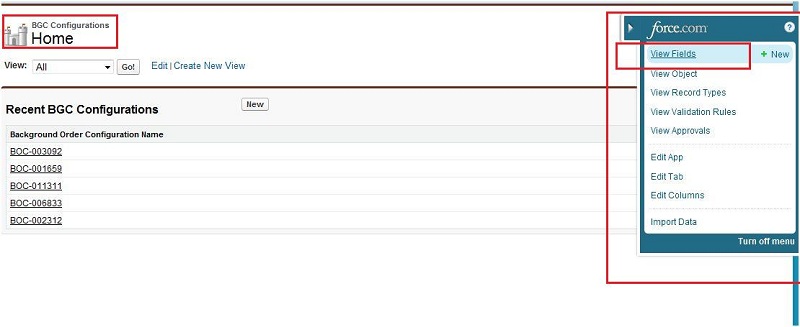
Step 4 : All the standard and custom fields of BGC configuration object is available on this page.
Note: We can create BGC configuration object field by clicking on new button on this page.
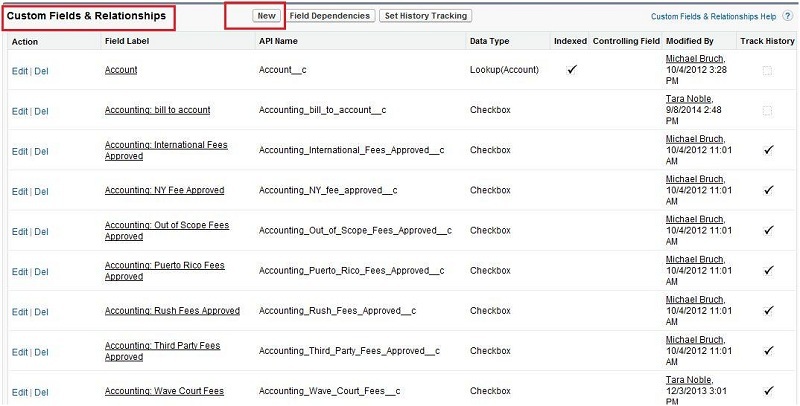
Important fields of BGC configuration object :
Field Name : Name
Display Formate : BOC-{000000}
This field name is background order configuration number but as this is a standard field of BGC configuration so we can write 'Name'(Fields's API name) instead of
field label name. This field holds the value of the background order configuration number. It is a standard field of BGC configuration object with data type : Auto Number.
Background Order Configuration Number field is used to define a unique value to a record.
The display format of background order configuration name explain below :
BOC : Initial string
{000000} : Initial Number.
Field Name : Account Name
This field holds the value of the account's name.
This is a lookup type of field. It is use to show the relation of account and BGC configuration object.
Field Name : Client ID
This field holds the value of the client id. It is a custom field of BGC configuration with data type : text.
Value will be entered in this field by the client. This field is use to show the client id of the client of this BGC configuration.
Field Name : Parent ID
This field holds the value of the Parent id. It is a custom field of BGC configuration with data type : Formula. It takes the value form
Account__r.Parent.Background_Check_Client_ID__c. It takes the background check client id of account object as a patent id of BGC configuration object.
It is use to show the relation of account and BGC configuration object.
Field Name : DT: Email Client
This is a checkbox type of field of BGC configuration. This field is being used to send the drug testing email to client
also with the applicant also who filled the drug testing details at client portal.
Field Name : DT: Email Applicant
This is a checkbox type of field of BGC configuration. This field is being used to send the drug testing email to applicant
also with the client when applicant filled the drug testing details at client portal.
Field Name : Enabled: Background Screening
This is a checkbox type of field of BGC configuration. This field indicates that client is enabled to order background screening.
Field Name : Enabled: Express Results
This is a checkbox type of field of BGC configuration. This field indicates that Express results should be enabled for this client.
Field Name : Service Order Options
This is a picklist type of field of BGC configuration. This field indicate if the client user is a 'Package', 'A La Carte' or both user.
It picklist values are : 'Package Only', 'A la carte Only', 'Package or A la carte'.
In main client portal, package list or a la carte services list displays according to this field on order screen.
Field Name : Is Vendor Integration Enable
This is a checkbox type of field of BGC configuration. This field indicates that vendor integration enable or not.
If checkbox is checked than enable otherwise disable. This is being used for given two REST Classes:
GetBackgroundSearchestoProcess
BackgroundSearchCriminalUpdate
Field Name : Disable Contemporaneous Notice
This is a checkbox type of field of BGC configuration.
This field is use to disable contemporaneous notice to the client.
The contemporaneous notice is actually send to applicant who have at least one searches record as
hit and pre-employ gave him a 8 hours time to dispute his hit record.
This contemporaneous include a cover letter and a notice letter.
PrintPdfCompReport exe is being used to print these notices.
Field Name : Default Package
This is a lookup type of field of BGC configuration.
This field is in lookup relation with BGC service package object.
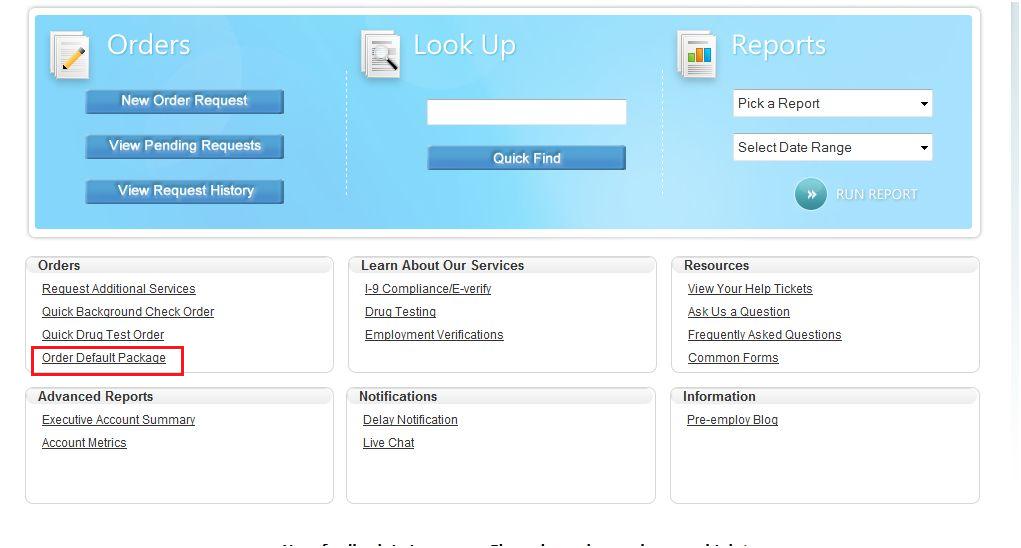
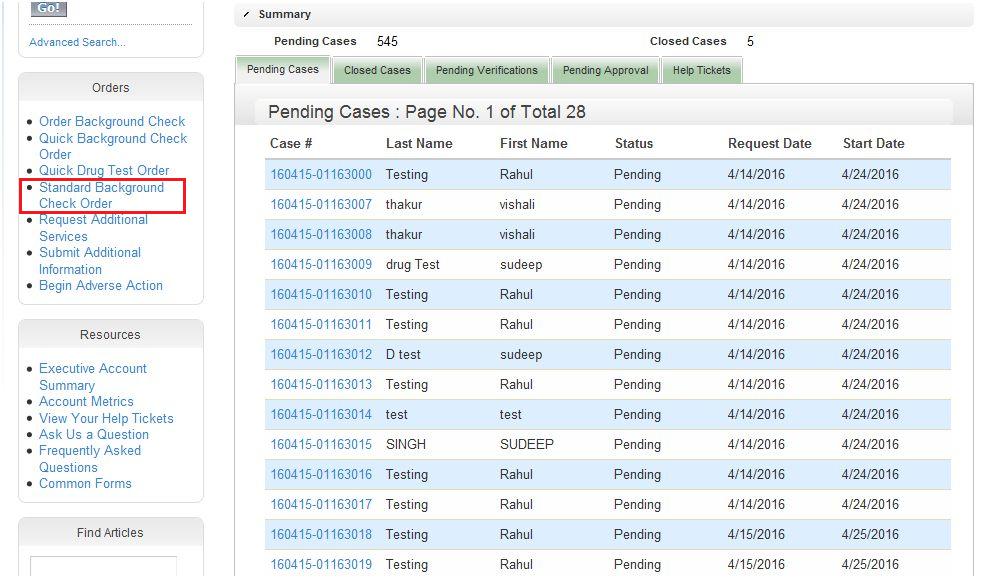
When a client place a Standard Background Check Order or Order Default Package from client portal then this selected package got used at that time,
please view the SS of client portal Quick Order below for it:
Field Name : Verification Review Enabled
This is a checkbox type of field of BGC configuration. This field is use to enable the verification review.
If this checkbox is checked then verification record of this client goes under compliance review instead of complete when a call
center staff complete the verification record in CCO module.
Field Name : MBC Account
This is a checkbox type of field of BGC configuration. If the checkbox of this field is checked than this indicates that is a single customer user and
MBC account. This client can place MBC order.
Field Name : Duplicate Interval
This is a number type of field of BGC configuration. This field indicates that how many days before we allow for duplicate orders to be entered.
Field Name : Duplicate Case Procedure
This is a picklist type of field of BGC configuration. This field indicates the procedure when duplicate case is received. 'Process Duplicate as Normal', 'Cancel Duplicate',
'Contact Client for Instructions', 'Contact Development for Instructions', 'Contact Customer Service for Instructions' are picklist value for this field.
Field Name : Duplicate Match Criteria
This is a picklist type of field of BGC configuration. This field is use to fixed the criteria on which duplicate order will be checked. This field will pick value from the picklist and based
on that value duplication will be checked. Picklist values are : 'SSN only', 'SSN and Last Name', 'SSN and Package', 'SSN and PO', 'SSN, Last Name and Package',
'SSN, Last Name and PO', 'SSN, Last Name, Package and PO', 'SSN, Package and PO'.
Field Name : Enabled: Grading
This is a checkbox type of field of BGC configuration.
This field indicates that account is a graded client if this field is checked and his case will be closed only after grading complete.
If this field is unchecked then case got closed automatically from background search trigger when all searches got closed.
Field Name : Enabled: Adverse Action
This is a checkbox type of field of BGC configuration.
This field indicates that client is enabled for adverse action if checkbox is checked.
This field is being used in PrintPdfCompReport exe for 8 hours applicant notification if there is at least one hit search present.
Field Name : Adverse Action Request Required
This is a checkbox type of field of BGC configuration. This field indicates that this client requires us to reach out to them on
any non-clear case to see if they need to do adverse action.
Field Name : DT: Expiration Days
This is a checkbox type of field of BGC configuration. This field indicates that the number of days from a 'Drug Test order request' to when
the 'Drug Test' will no longer be available for the applicant to take.
Field Name : DT: Location Site
This is a picklist type of field of BGC configuration. This field takes the value form the picklist value to indicate the location of the drug test. Picklist
values are : 'Closest to Applicant', 'Closest to Client Location', 'Pre-Selected Site', 'Other/See Specific Search'.
Field Name : Receives Case Creation Notification
This is a checkbox type of field of BGC configuration. This field indicate that case creation notification is received, if this field is checked.
If this field is unchecked than no notification is received for case creation.
Field Name : Notification Contact Email 1 to 4
This is a email type of field of BGC configuration. This field indicates email Address of client where Comprehensive report notifications(comp report) or other
notifications like delay jurisdiction etc will be send by pre-employ.
A client may have more than one email address and he can want to receive the report on each email address. In BGC configuration 4 email type of fields
is used to store client's different email address. Fields name to store client email address for notification is : 'Notification Contact Email 1 to 4'
Field Name : Invite Applicant to MBCR
This is a checkbox type of field of BGC configuration. This field is use to indicate that applicant is invited for MBCR or not. If the chackbox of this field is
checked than client is invited otherwise client is not invited for MBCR.
Field Name : IsPositionManagerIntegration
This is a checkbox type of field of BGC configuration. If this checkbox is checked that 'client type integration' will be assigned to 'PositionManager'. This is being used by
IntegrationStatusUpdates.exe
Field Name : SendInitialRequestReceip
This is a checkbox type of field of BGC configuration. If this field is checked than the initial order request recipe will be send to the client.
This field is used in PreEmployCase.trigger and in IntegrationStatusUpdates.exe. If the value of 'Method of Data Supply' field of pre employ case is
'Integration - XML' and the status of 'Internal case status' field is 'Approved to Start', than 'IsSendInitialRequestReceip' field will be checked by PreEmployCase.trigger.
In IntegrationStatusUpdates.exe, if the field 'IsSendInitialRequestReceip' is checked and 'Method of Data Supply' field value is 'Integration - XML' than
exe will unchecked this field.
Field Name : SendFinalCompletionConfirmation
This is a checkbox type of field of BGC configuration. If this field is checked than the final completion of order will be sent to the client.
This field is used in PreEmployCase.trigger and in IntegrationStatusUpdates.exe. If the value of 'internal case status' field of pre employ case is
'Cancelled - Per Client Request' or 'Complete' or 'Complete - All Results Clear' than 'IsSendFinalCompletionConfirmation' field will be checked by PreEmployCase.trigger.
In IntegrationStatusUpdates.exe, if the field 'IsSendFinalCompletionConfirmation' is checked and internal case status field value is 'Cancelled - Per Client Request'
or 'Complete' or 'Complete - All Results Clear' than exe will unchecked this field.
Field Name : SendFinalAbandon
This is a checkbox type of field of BGC configuration. If this field is checked than the final completion of order with all the case and searches result
will be sent to the client as well as applicant.
This field is used in PreEmployCase.trigger. If the value of 'internal case status' field of pre employ case is
'Complete' and order number of pre employ case is not equals to null than PreEmployCase.trigger will make 'IsSendFinalAbandon field checked'.
Field Name : SendEachServiceStatusUpdate
This is a checkbox type of field of BGC configuration. This field indicates that send each service status update to the client.
In pre employ case object this is a formula field which takes the value from 'SendEachServiceStatusUpdate' field of BGC configuration of account object.
In below screenshot you can see the setting and information stored in the BGC configuration object field for the particular account.