Integration Status Update Service
Introduction
Some of Pre-Employ.com’s current customers are using an automated integration system to request services, modify service requests and receive status
or information upon intermediate or final steps in the background screening process.
Data from Salesforce to Amazon AWS
The Amazon AWS system must have the ability to link data to specific Salesforce requests that are initiated. It is necessary when data has to either be re-sent,
when additional services are ordered or documents attached. For this reason, any BOOMI process after moving request data to Salesforce must return the unique
id in Salesforce to AMAZON AWS and an approved status.
Outgoing Message Types
Outgoing Message Delivery Methods
Production & Test client setting :
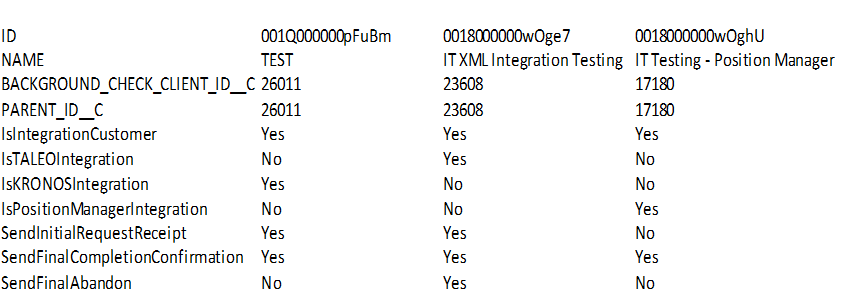
Logging
Every communication and result of it needs to be logged. Salesforce is not the place to do this for the ‘lack of memory’.
Web Services are creating the log into the SQL DB at table “IntegrationStatusUpdates”
Process of application :
Step 1: Initial Requests:
Basic conditions on BackgroundCheck Case(PreEmploy_Case__c) for initial requests :
Account's BGC Configuration's field SendInitialRequestReceipt (Account__r.BGC_Configuration__r.SendInitialRequestReceipt__c) should be true,
IsSendInitialRequestReceipt__c should be true, Method_of_Data_Supply__c should be 'Integration – XML', AWS_CaseCreation_Sync__c should be true, CreatedDate
should be greater than 2014-07-01
Step 2:
Now call the end point: http://sidespreemploy.arcsdev.com/IntegrationStatusUpdateService.asmx for web method GetCaseServiceStatus() which
returns CaseServiceStatus XML.
Step 3:
Now send the CaseServiceStatus XML got by above end point to Taleo's web service
http://secure-preemploy.arcsdev.com/TaleoIntegrationBeta/IntegrationStatusUpdateService.asmx by web method UpdateCaseServiceStatus() and
returns the response text.
=> Will update the BackgroundCheckCase by setting IsSendInitialRequestReceipt__c equals false
Step 4:
In next method SendEachServiceStatusUpdate(), update the salesforce satisfying some conditions
i.e. Internal Case Status (Report_Case_Status__c) should not have the values in ('Complete - Review Needed', 'Complete - All Results Clear', 'Complete',
'Cancelled - Per Client Request')
OR
LastModifiedDate should be “LAST_N_DAYS:30” and returns the result xml of SendServiceStatusUpdate()
Step 5:
SendServiceStatusUpdate updates the BackgroundCheckSearch conditionally as,
Any one of (Status_Standard__c should be 'Pending' OR
Status_Standard__c should be 'Hit' OR
Status_Standard__c should be 'Clear' OR
Status_Standard__c should be 'Complete' OR
Status_Standard__c should be 'Unverified Hit')AND
Search_Integration_Status__c should be blank
Step 6:
Again called the web services mentioned in Step 2 to update the BackgroundCheckSearch and retorns the result
Step 7:
SendFinalCompletionConfirmation() : This method consumes the web services and in step 2 will update the BackgroundCheckCase by setting IsSendFinalCompletionConfirmation__c equals false
Step 8: SendFinalAbandon() :
This method consumes the web services and in step 2 will update the BackgroundCheckCase by setting IsSendFinalAbandon__c equals false
Process of Web Service:
Receives Detail of Status Updates of BackgroundCheckCase from Salesforce and stores it in XML format which is further posted to its
related Web Service for further processing.
It checks Account's BGConfiguration's settings for that BackgroundcheckCase i.e. IsTaleoIntegration__c is true => Taleo Integarion
IsKronosIntegration__c is true => Kronos Integration
IsPositionManagerIntegration__c is true => Position Manager Integration
Cond. 1:
The value of "Graded Client"(Graded_Client__c) must be one of the "Yes - Graded" or "Not Graded"
Cond. 2:
if "Case Status"(Report_Case_Grade__c) is empty then this node will pick up the value from "Case Status"(API : Client_Case_Status__c)
else it will pick the value from "Case Status"(API : Report_Case_Grade__c)
Production Status Receiver URL:
Production URL for Salesforce to point to deliver the status-response-XMLs is
https://secure.pre-employ.com/integrationstatusupdates/integrationstatusupdateservice.asmx
Position Manager
Web service address:
http://secure-preemploy.arcsdev.com/PositionManager/ExternalSystem.aspx
Code Project name: PositionManager/PositionManagerAWS/PositionManagerWeb/PositionManager\PositionManagerAWS\PositionManagerWeb\Default.aspx.cs
PEIS interface name in Requests table: "PosMgr"
-
PEIS interface name in Users table: "PosMgr"
-
Amazon EC2 web-server instance name: "PRD-WEB1A"
-
Amazon EC2 SQL-server instance name: "PRD-SQL1A"
-
Amazon EC2 web-server external IP address: 54.236.166.116
-
Amazon IIS website information:
-
logging and debug emails
-
Test harness project, GUIs:
-
Test Client info: ClientID, password
-
Test ClientID (processed into production Salesforce) : 17180 {"IT Test Account - Position Manager"}
-
Test LoginName: "PE_PositionManagerTest"
-
Test password: "password5"
Special PEIS tables for PositionManager:-
Postback overview
Salesforce
Note:
For Position Manager, while Salesforce sends lots of status information to the postback processing service on our side, the only thing that actually ultimately
gets sent back to PositionManager is basically a notification that the case is closed, and a link to the case in Salesforce portal.
Postbacks start when certain business rules in Salesforce are met, which causes a trigger to place a Postback XML in an internal queue within Salesforce.
After some minutes (configured by Anshu Sir, currently 4-10 minutes), another trigger empties the queue and sends the Salesforce-XMLs to a Pre-Employ
.Net webservice currently hosted on a websever in Amazon. This webservice receives the Salesforce based postback-status xml, re-formats the data to a
Taleo specific XML format, and then posts in turn to a TALEO SOAP XML interface.
.Net StatusUpdate webservice
PreEmployClientIntegrationAWS\IntegrationServices\App_Code\IntegrationStatusUpdateService.cs Hosted on: Amazon EC2 webserver: PRD-WEB1A
Webservice URL : https://secure.pre-employ.com/IntegrationStatusUpdates/IntegrationStatusUpdateService.asmx
Salesforce BGC Configuration settings, must all be checked in the Account settings for the given Case. IsIntegrationCustomer IsPositionManagerIntegration
SendFinalCompletionConfirmation
Salesforce special business rules :
Salesforce BGC object for Client Account must be configured per above Per-case: CaseOrigin for individual case must be: Salesforce "Case" object data field
"Method of Data Supply" – value: "Integration - Data Transfer".
Note: This rule validates that the given case's origin was from the PeXML system, not manually entered, or portal entered, etc. For a given client,
like Amedisys, they may have various different cases in the Salesforce system whose origination was from different sources such as manual, other automated
processes, or portal. For postbacks, we only want to send postbacks for cases that originated with Taleo-PeXML integration system.
Per-case: "AWS_CaseCreation_Sync" checkbox must be checked
Note:
This rule validates the Salesforce Casenumber has been synchronized back to PEIS database in AWS for the given case. This is important because the status-XML
that Salesforce sends to StatusUpdateWebService embeds/uses this Salesforce CaseNumber as a unique identifier in calling the webservice. Due to asynchronous nature
of the PEIS db, importing to Salesforce, Salesforce processing of the case, and Salesforce postback to GetStatusupdate webservice, there is a chance that PEIS and
Salesforce are not fully in sync with regards to Salesforce casenumber. This prevents errors being returned to Salesforce needlessly.
Note: Another scenario where errors may occur is if the combination of Client configuration and Case settings in Salesforce improperly sends a postback to the
StatusUpdateWebService. If this occurs, then the webservice returns an error to Salesforce, which re-queues the postback-XMLfor retry. This can result in
ongoing error looping which floods the logging system(s) with error messages.
Salesforce status values that are used to send back.
The HTTP postback URL contains two status elements:
OrderStatus=COMPLETED
PositionManager only gets the postback when the Order is complete, and this value is always hard coded to "COMPLETED"
For actual status values of Case and searches, Client is given a URL to the case in the Salesforce portal to look up. This value is a unique URL for the specific case.
Process of Web Service
Web Method : UpdateCaseServiceStatus(username, password, CaseServiceStatusXML, SFCaseNumber)
The XML contains the following information:
Note: PositionManager gets a "full XML" from Salesforce when the case closes, but the actual values in the XML are basically not used, and effectively 'dropped'.
This is because it shares an XML postback format with other integration types that do use the actual XML values.
ClientID
ClientIntegrationType : (Taleo/Kronos/PositionManager)
This information is used for routing the case status information to the right function code for posting back to various vendors i.e. Taleo/Kronos/PositionManager
EventType (CaseStatusSourceType) : Initial/Individual-Search/Final
This currently is used for logging purposes to differentiate between which type of event initiated the postback Initial/Individual-Search/Final
Not used for actual postback to PositionManager client.
SF CaseNumber
This is used for logging, but mainly to synchronize and verify the postback with a particular record in the PEIS database "Requests" table.
CaseSummary Status
Not used for actual postback to PositionManager client.
GradedCaseSummaryStatus
Not used for actual postback to PositionManager client.
CaseOrderStatus - not currently used. Currently, a CaseorderStatus of "Pending" is always posted back to Clients, a legacy code inheritance that may be
a bug, but is what is currently happening.
CaseLink
The unique link to that particular case in Salesforce, for the customer to click on to view in the Salesforce customer portal
OrderReceivedDate - not used currently
OrderCompletedDate - is populated, but not used.
Note: the "Order" object in Salesforce is different than the "Case" object.
List of Individual Screening Status
Not used for actual postback to PositionManager client.
Process to manually send a postback:
Within Salesforce.com, from the Case object/page, manually check one of the following checkboxes: IsSendFinalCompletionConfirmation
Wait for the next "Queue flush" (can be between 4-10 minutes) Look in PEIS log database table [PEIS].[dbo].[SalesforceCaseStatusLog] for
entry indicating postback sent/received etc
Process to manually stop a "stuck postback"
Identify from [PEIS].[dbo].[SalesforceCaseStatusLog] the Salesforce CaseNumber that is "stuck"
Also identify from [PEIS].[dbo].[SalesforceCaseStatusLog] the "CaseStatusSourceType" value for the Case that is "stuck"
TALEO XML SEND BACK Sample Structure
See details in the attached document named “taleo_send_results_sample.xml”
<?xml version="1.0" encoding="UTF-8"?>
<Envelope version="01.00">
<Sender>
<Id>PreEmploy</Id>
<Credential />
</Sender>
<Recipient>
<Id>Taleo</Id>
</Recipient>
<TransactInfo transactType="data">
<RequestId>1721XXX</RequestId>
<TimeStamp>2014-03-31 06:01:19</TimeStamp>
</TransactInfo>
<Packet>
<PacketInfo packetType="data">
<PacketId>2014-03-31 06:01:191721XXX</PacketId>
<Action>OrderBackgroundStatus</Action>
<Manifest>BackgroundReports.xsd</Manifest>
</PacketInfo>
<Payload><![CDATA[<?xml version="1.0" encoding="UTF-8"?>
<BackgroundReports>
<BackgroundReportPackage type="status">
<ProviderReferenceId />
<PackageId>
<IdValue>QS385</IdValue>
</PackageId>
<ScreeningStatus>
<OrderStatus>Pending</OrderStatus>
<ResultStatus>Pending</ResultStatus>
</ScreeningStatus>
<Screenings>
<Screening type="Criminal">
<ScreeningStatus>
<OrderStatus>Complete</OrderStatus>
<ResultStatus>Pending</ResultStatus>
</ScreeningStatus>
</Screening>
<Screening type="Employment Verification">
<ScreeningStatus>
<OrderStatus>Complete</OrderStatus>
<ResultStatus>Pending</ResultStatus>
</ScreeningStatus>
</Screening>
<Screening type="License Verification">
<ScreeningStatus>
<OrderStatus>Complete</OrderStatus>
<ResultStatus>Pending</ResultStatus>
</ScreeningStatus>
</Screening>
<Screening type="Reference Verification">
<ScreeningStatus>
<OrderStatus>Complete</OrderStatus>
<ResultStatus>Pending</ResultStatus>
</ScreeningStatus>
</Screening>
<Screening type="Degree Verification">
<ScreeningStatus>
<OrderStatus>Complete</OrderStatus>
<ResultStatus>Pending</ResultStatus>
</ScreeningStatus>
</Screening>
</Screenings>
</BackgroundReportPackage>
<UserArea>
<AdditionalItems>
<AdditionalItem type="OriginatorInfo" qualifier="version">
<Text>10.0</Text>
</AdditionalItem>
<AdditionalItem type="OriginatorInfo" qualifier="dtdVersion">
<Text>6_10</Text>
</AdditionalItem>
<AdditionalItem type="OriginatorInfo" qualifier="transactId">
<Text>1800001XXX</Text>
</AdditionalItem>
<AdditionalItem type="OriginatorInfo" qualifier="transactTimestamp">
<Text>2014-02-27T18:24:20</Text>
</AdditionalItem>
<AdditionalItem type="OriginatorInfo" qualifier="recipientZone">
<Text>23608</Text>
</AdditionalItem>
<AdditionalItem type="OriginatorInfo" qualifier="reportRecipient">
<Text>https://passportxqa4.taleo.net/enterprise/passport/xml?auth=1</Text>
</AdditionalItem>
<AdditionalItem type="OriginatorInfo" qualifier="serviceIdentifier">
<Text>Pre-Employ</Text>
</AdditionalItem>
<AdditionalItem type="OriginatorInfo" qualifier="instanceId">
<Text>2277e0c0-8c88-4605-9649-0e0d78e10XXX</Text>
</AdditionalItem>
<AdditionalItem type="OriginatorInfo"
qualifier="requestSystemGenerated">
<Text>0</Text>
</AdditionalItem>
</AdditionalItems>
<Comments>3812XXX</Comments>
</UserArea>
</BackgroundReports>]]></Payload>
</Packet>
</Envelope>