How to create the data loader script for delete the record
Firstly download the dataloader for windows
- ApexDataLoader.exe
- Install this .exe file in windows
Create The Encrypted Key for the password encryption which is used in Process-conf.xml.
- Open a command prompt window by clicking Start | All Programs | Accessories | Command Prompt. Alternatively, you can click Start | Run, enter cmd in the Open field, and click OK
- In the command window, enter cd\ to navigate to the root directory of the drive where Data Loader is installed.
cd C:\Program Files (x86)\salesforce.com\Data Loader \bin
- Create an encryption key by entering the following command. Replace
with any string.
encrypt.bat - g <seedtext>
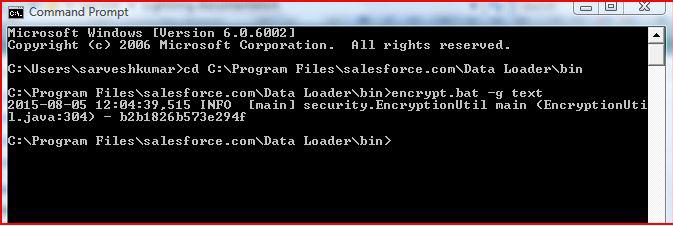
The generated Encrypted Key is b2b1826b573e294f
- This Key is save in .key file
Create The Encrypted Password for login the username
- In this step, you create the encrypted password using the key that you generated in the previous step.
- In the same command prompt window, enter the following command. Replace <password> with the password that Data Loader uses to log in to Salesforce. Replace
with the file path to the key.txt file that you created in the previous step.
encrypt.bat - e <password> "<filepath>\filename.key"
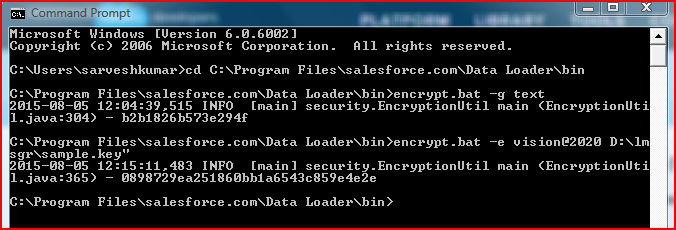
- This encrypted password is used in process-conf.xml file for login userpassword
Create the Field Mapping File
- The field mapping file associates data sources with destinations. This is a text file, typically with an .sdl file extension. for deletion the record mapping file is the most important because record is deleted with mapping file, Like
so the data source is on the left of the equals sign and the destination field is on the right.
Create Configuration File
- The process-conf.xml file contains the information that Data Loader needs to process the data. Each <bean> in the process-conf.xml file refers to a single process such as an insert, upsert, export,
and delete so on. This file ..\conf directory.
- Create bean for Extract the record for deletion
<bean id="csvPayrolDetailExtractProcess"
class="com.salesforce.dataloader.process.ProcessRunner"
singleton="false">
<description>csvPayrolDetailsExtract job gets account info from salesforce and saves info into a CSV file."</description>
<property name="name" value="csvPayrolDetailExtract"/>
<property name="configOverrideMap">
<map>
<entry key="sfdc.debugMessages" value="false"/>
<entry key="sfdc.debugMessagesFile"
value="C:\project\arcs_scm\arcsdev.com\preemploy\utilities\dataloadercliq\samples\status\sfdcSoapTrace.log"/>
<entry key="sfdc.endpoint" value="https://test.salesforce.com"/>
<entry key="sfdc.username" value="anshu.jain@arcscorp.com.p2"/>
<entry key="sfdc.password" value="8dff883fda7b0624de6aaaa2cbd54f7f"/>
<entry key="process.encryptionKeyFile"
value="C:\project\arcs_scm\arcsdev.com\preemploy\utilities\dataloadercliq\Key\sample.key"/>
<entry key="sfdc.timeoutSecs" value="600"/>
<entry key="sfdc.loadBatchSize" value="200"/>
<entry key="sfdc.entity" value="PayrollDetail__c"/>
<entry key="sfdc.extractionRequestSize" value="500"/>
<entry key="sfdc.extractionSOQL" value="Select Id FROM PayrollDetail__c WHERE LastModifiedDate < LAST_N_DAYS:90 "/>
<entry key="process.operation" value="extract"/>
<entry key="process.mappingFile"
value="C:\project\arcs_scm\arcsdev.com\preemploy\utilities\dataloadercliq\conf\PayrolDetailExtractMap.sdl"/>
<entry key="dataAccess.type" value="csvWrite"/>
<entry key="dataAccess.name" value="C:\project\arcs_scm\arcsdev.com\preemploy\utilities\dataloadercliq\Csv File\PayrolDetailextract.csv"/>
</map>
</property>
</bean>
- Create bean for delete the record as per extract csv file
<bean id="csvPayrolDetailDeleteProcess"
class="com.salesforce.dataloader.process.ProcessRunner"
singleton="false">
<description>csvPayroDetailDelete job gets account info from salesforce and saves info into a CSV file."</description>
<property name="name" value="csvPayrolDetailDelete"/>
<property name="configOverrideMap">
<map>
<entry key="sfdc.debugMessages" value="false"/>
<entry key="sfdc.debugMessagesFile"
value="C:\project\arcs_scm\arcsdev.com\preemploy\utilities\dataloadercliq\samples\status\sfdcSoapTrace.log"/>
<entry key="sfdc.endpoint" value="https://test.salesforce.com"/>
<entry key="sfdc.username" value="anshu.jain@arcscorp.com.p2"/>
<entry key="sfdc.password" value="8dff883fda7b0624de6aaaa2cbd54f7f"/>
<entry key="process.encryptionKeyFile"
value="C:\project\arcs_scm\arcsdev.com\preemploy\utilities\dataloadercliq\Key\sample.key"/>
<entry key="sfdc.timeoutSecs" value="600"/>
<entry key="sfdc.loadBatchSize" value="200"/>
<entry key="sfdc.entity" value="PayrollDetail__c"/>
<entry key="sfdc.extractionRequestSize" value="500"/>
<entry key="sfdc.extractionSOQL" value="Select Id FROM PayrollDetail__c WHERE LastModifiedDate < LAST_N_DAYS:90 "/>
<entry key="process.operation" value="delete"/>
<entry key="process.mappingFile" value="C:\project\arcs_scm\arcsdev.com\preemploy\utilities\dataloadercliq\conf\PayrolDetailExtractMap.sdl"/>
<entry key="dataAccess.type" value="csvRead"/>
<entry key="dataAccess.name" value="C:\project\arcs_scm\arcsdev.com\preemploy\utilities\dataloadercliq\Csv File\PayrolDetailextract.csv"/>
</map/>
</property/>
</bean/>
For more information about the process configuration parameters, see Data Loader Process Configuration Parameters.
- sfdc.endpointbat - Enter the URL of the Salesforce instance for your organization; for example, https://test.salesforce.com.
- sfdc.usernamebat- Enter the username Data Loader uses to log in.
- sfdc.passwordbat - Enter the encrypted password value that you created above.
- process.mappingFilebat - Enter the path and file name of the mapping file.
- dataAccess.Namebat - Enter the path and file name of the data file that contains the accounts that you want to import.
- sfdc.debugMessagesbat - Currently set to true for troubleshooting. Set this to false after your import is up and running.
- sfdc.debugMessagesFilebat - Enter the path and file name of the command line log file.
- process.outputSuccess - Enter the path and file name of the success log file
- process.outputError - Enter the path and file name of the error log file.
- process.Operation - Enter the operation name which we want to perform.
- sfdc.entity - Enter the entity name on which perform the operation.
Create .csv File for store Extract data that is need to be deleted.
- I have created .csv files for all process. This .csv file have to used for store the record.
Create Batch File for run multiple process in one time.
- I have created the batch file for delete the record like DeleteObject.bat in ..\Data Loader\bin directory and pass all process name and filepath of process-conf.xml. Like
@setlocal enableextensions
@cd /d "%~dp0"
call process.bat "<full path of process-config.xml>" <processName>
- @setlocal enableextensions and @cd /d "%~dp0" used for current directory from system32 in batch file for run as Administrator.
Run batch file by run as Administrator for perform the Delete operation. And operation perform successfully.
Note :
- Data loader command line use Bulk API for delete records .
- This Configuration is one time. After Sandbox Refresh no need to configuration to sandbox again. Only Run batch file by run as Administrator for delete record every time for all object
Click here for update/replace