Position Manager - Integration & debug on Dev Server
Overview
This document provides information on background check integration between the SCREENING VENDOR and HealthcareSource.
HealthcareSource has a platform for integrating our applicant tracking system (ATS) with other client/vendor assessment systems.
The connection to and from Position Manager is accomplished via HTTP/HTTPS post with the information in XML structure.
Order Lifecycle Flow
-
A user within our ATS(Application tracking system) initiates a background check order with SCREENING VENDOR. The ATS composes an XML document,
posts the data to the URL provided by SCREENING VENDOR. The post variable containing the XML is URL-encoded and named “strApplicantData”.
-
SCREENING VENDOR receives the request, using the following XML elements default values to authenticate the request:
-
<SUBMITTER_ID> - This element contains an identifier provided by SCREENING VENDOR to identify the healthcare facility requesting the order
-
<SUBMITTER_PASSWORD> - An optional password associated with SUBMITTER_ID
-
<CURRENT_USER_ID> - The username assigned by SCREENING VENDOR to identify the user requesting the order initiation
The content of these fields is configurable.
-
SCREENING VENDOR parses the order request and creates an order within their system using the values provided to pre-populate fields as appropriate. Note that
the PARTNER_REFERENCE element’s value must be stored because it will be required (without alteration) for successful execution of the callback used to
update orders within HealthcareSource’s ATS.
-
At this point, a separate browser window will open and the user will see content determined by the response of the order initiation.
This content is completely controlled by SCREENING VENDOR.
-
The ATS user completes any necessary steps to finalize order submission. At this point, SCREENING VENDOR sends an update to the callback URL provided by
HealthcareSource. This callback requires two query string variables:
-
OrderStatus=INPROCESS
-
PartnerReference=[PARTNER_REFERENCE XML element value]
There is also an optional query string parameter:
-
OrderUrl=[URL that the ATS user can use to view the report for their order]
-
When an order is fully completed and all related reports are ready, SCREENING VENDOR sends a request to the callback URL.
This callback requires two query string variables:
-
OrderStatus=COMPLETED
-
PartnerReference=[PARTNER_REFERENCE XML element value]
There is also an optional query string parameter:
-
OrderUrl=[URL that the ATS user can use to view the report for their order]
Element Values in Request XML
A few elements have specific enumerations of values or requirements for their construction.
-
PARTNER_REFERENCE – Formatted as ClientID|VendorOrderID|ApplicationID. This value must be sent when initiating a callback to HealthcareSource to update an order.
-
TRACKING_NUMBER – This is the Application ID
-
STATE - 2 char abbreviations only
-
GENDER (F, M)
-
RACE (W, B, H, A, I, U)
Changes from Position Manager 10 Integration
The callback URL used by the SCREENING VENDOR to send order update information to HealthcareSource is given below,
http://pm.healthcaresource.com/PM/VendorAcknowledgement/ProcessAcknowledgement (just for the reference, It will not run on our IP address)
The URL of the window that is opened at order initiation is completely controlled by SCREENING ORDER.
Listed below are the differences between Position Manager 10 and 11 regarding the XML structure and values.
-
In Position Manager 10, the value of the PARTNER_REFERENCE element value is ClientID|VendorOrderID|ApplicantID. In Position Manager 11
the ApplicantID portion of this value is replaced by the ApplicationID (also known as the Tracking ID).
-
In Position Manager 10, the value of the TRACKING_NUMBER element is the Applicant ID. In Position Manager 11 the value of this element is the Application ID.
-
In Position Manager 10, the specification for ALTERNATE_NAMES had a child ALTERNATE_NAME that contains the name parts. In Position
Manager 11 the name parts are nested directly in the ALTERNATE_NAMES element.
-
In Position Manager 10, the specification for DRIVERS_LICENSES had a child CANADA_LICENSE with the same children as US_LICENSE. In Position Manager 11 CANADA_LI
Technical Guide :(dev server environment)
-
PEIS interface name in Requests table: "PosMgr"
-
PEIS interface name in Users table: "PosMgr”
-
Server : http://secure-preemploy.arcsdev.com
-
Database : PEIS, ZipCodes
-
User Id : devsites1489
-
Password : Zo(p0*a!l2}a
-
Website information
Special setting or configuration needed :
-
|
ClientID
|
ServiceGroupCode
|
Active
|
|
17180
|
17180
|
1
|
-
|
ServiceGroupID
|
ServiceID
|
Service GroupCode
|
Group ChargePer
|
Active
|
Max Quantity
|
Client Code
|
Min Quantity
|
All Names
|
Unlimited Quantity
|
All Counties
|
|
1480
|
1
|
17038
|
0
|
1
|
1
|
NULL
|
0
|
0
|
0
|
0
|
|
1481
|
3
|
17038
|
0
|
1
|
1
|
NULL
|
0
|
0
|
0
|
0
|
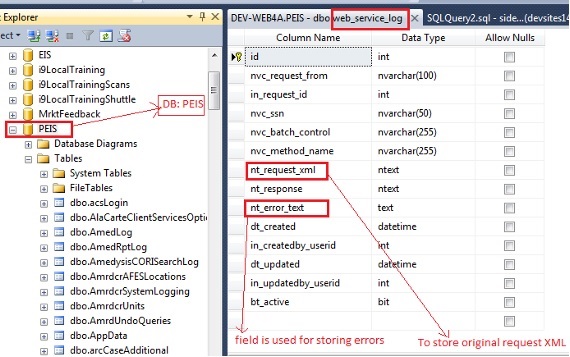
We have a logging table in SQL DB i.e. web_service_log and we can query on this table for any error and original XML with all requested data.
Structure of table:
Steps to query for errors
1) First we need to query for the original XML as we have to get SSN NO./Batch Control Code for further queries:
“SELECT nt_request_xml FROM web_service_log WHERE nvc_request_from = 'posmgr' AND nt_request_xml like '%[data like names etc.]%' AND dt_created BETWEEN
'[Date Value]' AND '[Date Value]' ORDER BY id DESC”
Note: Original requested XML will necessarily be logged in case of any errors except server & DB connectivity errors.
2) Need to get the SSN No. from XML which will be in the following node:
<SSN>999999999</SSN>
3) Need to get the batch control number, requestor control, code transaction id (all are aliases) from XML which will be in the following node:
<PARTNER_REFERENCE>1755|4|165204</PARTNER_REFERENCE>
4) In case, where SSN No./ BatchControlNo. is saved in the table, we can query for the errors logged as follows:
“SELECT nt_error_text, dt_created FROM web_service_log WHERE nvc_request_from = 'posmgr' AND nvc_batch_control = '[Batch Control No]'
OR nvc_ssn = '[SSN NO.]' ORDER BY id DESC”
5) In case, where SSN No. & BatchControlNo. was not logged when the error occurred, we can query for the errors as follows:
“SELECT * FROM web_service_log WHERE nvc_request_from = 'posmgr' AND dt_created BETWEEN '[Date Value]' AND '[Date Value]' ORDER BY id DESC”
6) If the error is provided by client and error date duration is known, we can query as follows:
“SELECT nt_error_text, dt_created FROM web_service_log WHERE nvc_request_from = 'posmgr' AND dt_created BETWEEN '[Date Value]' AND '[Date Value]'
AND nt_error_text like '%[Error]%' ORDER BY id DESC”
Check success status of Request:
We need to query in following tables to see the successful posting of requested data:
1. select top 10 * from requests order by requestid desc
2. select * from requests where requestid = [Request ID]
3. select * from requestsubjects where requestid = [Request Id]
4. select * from requestsubjecteducation where requestsubjectid = [Requestsubject Id]
5. select * from requestsubjectemployment where requestsubjectid = [Requestsubject Id]
6. select * from requestsubjectreferences where requestsubjectid = [Requestsubject Id]
7. select * from requestservices where requestid = [Request Id]
If data is available in every table as per request XML then it represents the success of request.
XML Structure: HCS/Client/Vendor Identification
<REQUIREMENTDATA Version="3.0">
<SUBMITTER_ID />
<CURRENT_USER_ID />
<SUBMITTER_PASSWORD />
<SUBJECT>
<CUSTOMER_SUB />
<QUOTEBACK />
<PARTNER_REFERENCE />
<FACILITY>
<FACILITY_CODE schemeID="Code" />
<FACILITY_NAME schemeID="Name" />
<CITY schemeID="City" />
<STATE schemeID="State" />
<ZIP schemeID="Zip Code" />
</FACILITY>
<DEPARTMENT>
<CODE schemeID="Code" />
<NAME schemeID="Name" />
</DEPARTMENT>
<APPLICANT_ID />
<TRACKING_NUMBER />
<REQUEST_COPY />
<FIRST_NAME />
<MIDDLE_NAME />
<LAST_NAME />
<EMAIL_ADDRESS />
<MAIDEN_NAME />
<SUFFIX />
<SSN />
<DOB_MMDDYYYY /> (format: MMDDYYYY)
<GENDER />
<RACE />
<PHONE /> (format: ###-###-####)
<WORK_PHONE />
<ALTERNATE_PHONE_1 />
<ALTERNATE_PHONE_2 />
<ALTERNATE_NAMES>
<FIRST_NAME />
<MIDDLE_NAME />
<LAST_NAME />
</ALTERNATE_NAMES>
<ADDRESSES>
<ADDRESS strType='Current'>
<ADDRESS_LINE />
<CITY />
<COUNTY />
<STATE />
<PROVINCE />
<COUNTRY />
<POSTAL_CODE />
<FROM /> (format: MM/YYYY)
<TO /> (format: MM/YYYY)
</ADDRESS>
<ADDRESS strType='Previous'>
<ADDRESS_LINE />
<CITY />
<COUNTY />
<STATE />
<PROVINCE />
<COUNTRY />
<POSTAL_CODE />
<FROM /> (format: MM/YYYY)
<TO /> (format: MM/YYYY)
</ADDRESS>
</ADDRESSES>
<DRIVERS_LICENSES>
<US_LICENSE>
<STATE />
<NUMBER />
<EXP_DATE /> (format: MM/YYYY)
<TYPE />
</US_LICENSE>
</DRIVERS_LICENSES>
<EDUCATION_VERIFICATION>
<EDUCATION>
<NAME />
<ADDRESS_LINE />
<CITY />
<STATE />
<PROVINCE />
<POSTAL_CODE />
<COUNTRY />
<PHONE />
<DATE_BEGIN /> (format: MM/YYYY)
<DATE_END /> (format: MM/YYYY)
<GRADUATED /> (format: MM/YYYY)
<GRADUATION_DATE /> (format: MM/YYYY)
<MAJOR />
<DEGREE />
</EDUCATION>
</EDUCATION_VERIFICATION>
<PROFESSIONAL_LICENSE_VERIFICATION>
<LICENSE>
<TYPE />
<NUMBER />
<STATE />
<EXP_DATE /> (format: MM/YYYY)
</LICENSE>
</PROFESSIONAL_LICENSE_VERIFICATION>
<EMPLOYMENT>
<EMPLOYER>
<NAME />
<ADDRESS_LINE />
<CITY />
<STATE />
<PROVINCE />
<COUNTRY />
<POSTAL_CODE >
<PHONE />
<POSITION />
<DATE_HIRED /> (format: MM/YYYY)
<DATE_LEFT /> (format: MM/YYYY)
<SALARY />
<CONTACT_PERSON />
<CONTACT_EMPLOYER />
<JOB_DUTIES />
<REASON_LEFT />
</EMPLOYER>
</EMPLOYMENT>
<REFERENCES>
<REFERENCE>
<REF_NAME />
<REF_ADDRESS />
<REF_PHONE_NUMBER />
<REF_RELATIONSHIP />
<REF_EMAIL />
</REFERENCE>
</REFERENCES>
<PACKAGE_TYPE />
</SUBJECT>
</REQUIREMENTDATA>
Test the Position Manager Integration on devserver (Step by Step explpanation)
-
The required data getting inserted into desired tables like
requests table in SQL DB
-
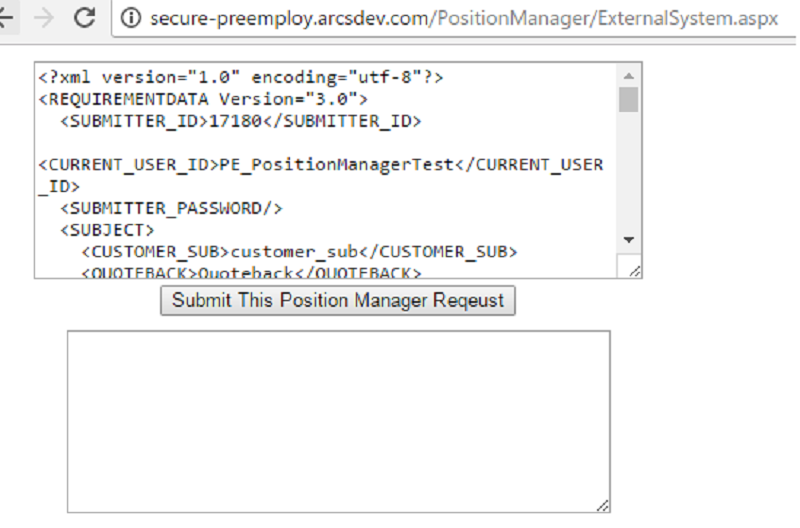
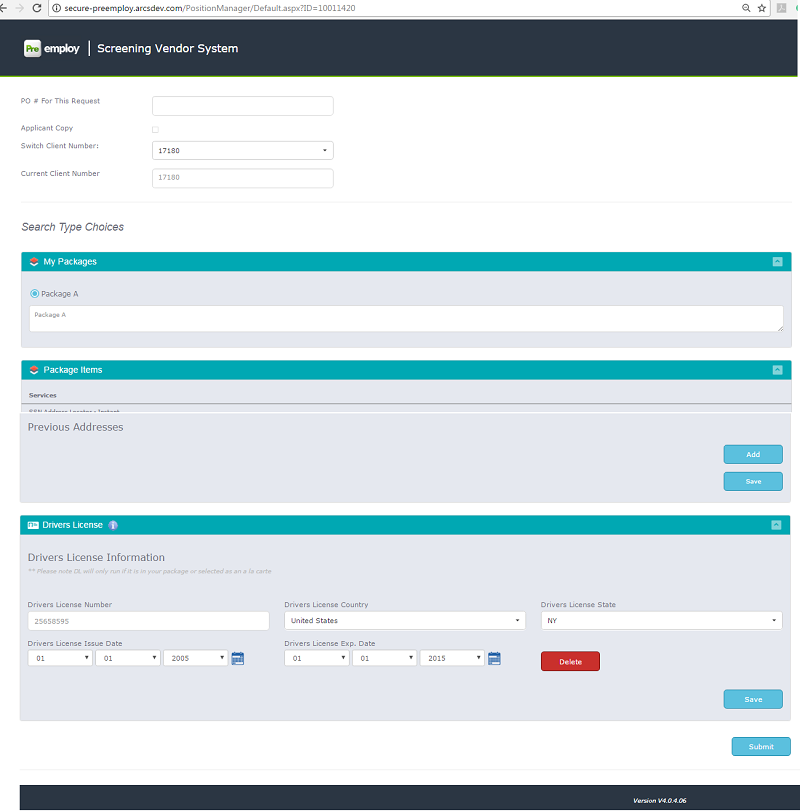
A form will be appeared having the details of request xml in edit format
-
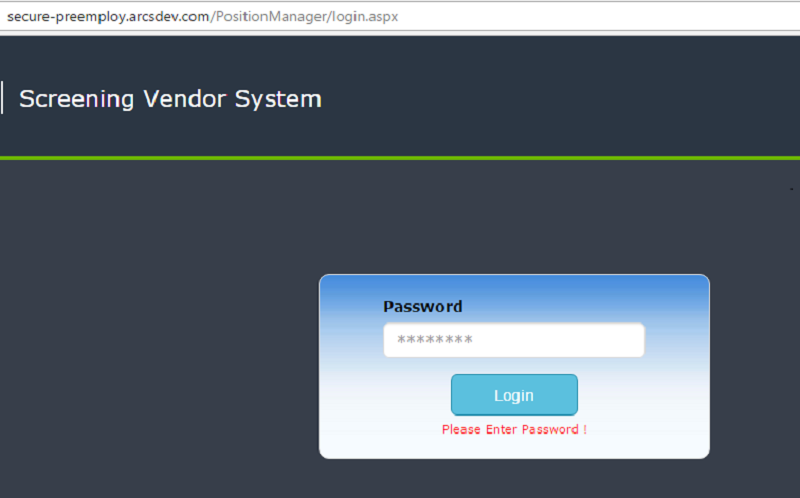
After successful login below screen will be shown
-
If needed, edit the information and submit, this order will be placed.
-
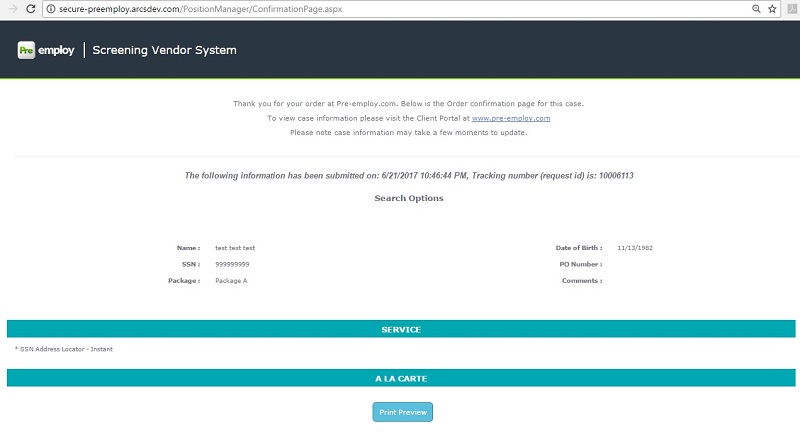
Order placement confirmation window will be seen in printable form. (as below screen)