Metro Search Functionality
Metro is Custom button on the
Background Check Case (PreEmploy_Case__c)
Object Which is used to create the searches according to the selected
Metro Collection and Metro County
on the MetroSearch VisualForce Page.
For Add Search Page:
Click on All Tabs ----> Background Checks ----> Click on the Case Link ---> Click on the
Metro Search
Button
Whenever we click on the Metro Search Button Then Its redirect to the MetroAddSearch Visual Force Page.
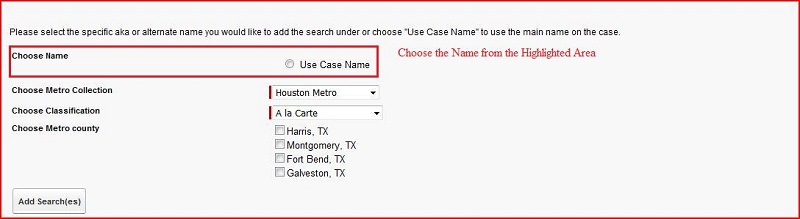
Working of Choosing the Use Case Name:
- In this case AddSearch Controller contain the method Name: lstAkaName
- We have get the sCaseNameId from URL and Add the Use Case Name in Default Value for any Select Option
- Then write the Query on Alternate Name and get the Combined_Name_Type__c where Validated__c checked and Invalid__c unchecked
- Then add the Alternate Name Id and Combined_Name_Type__c in Select Option
- Then call this method in
Select Options
Tag Under the
Select Radio
Tag
- On the Change of Select Radio we have call the
All Types
Method in
Action Support
Tag
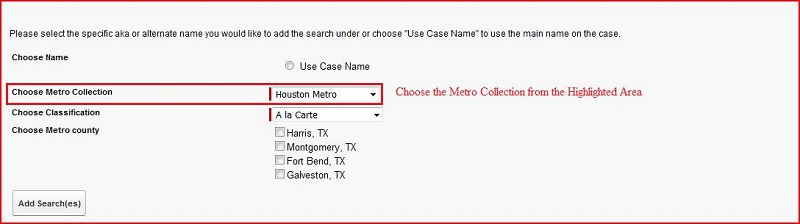
Working of AddSearch Controller: getMetro Method
- In this method we have created the List Type SelectOption.
- Add the Metro Collection in the List
- We have Added the Value in the List Name Value Pair:
--Select --,-- Select --
Houston Metro, Houston Metro
Dallas Metro, Dallas Metro
Tulsa Metro, Tulsa Metro
Starr Metro, Starr Metro
Austin Metro, Austin Metro
Oklahoma City Metro, Oklahoma City Metro
Corpus Christi Metro, Corpus Christi Metro
San Antonio Metro, San Antonio Metro
Azle Metro, Azle Metro
Albuquerque Metro, Albuquerque Metro
Midland Metro, Midland Metro
El Paso Metro, El Paso Metro
Portland Metro, Portland Metro
- Call this method in selectOptions under selectList in Visual Force Page
- In the SelectList We use the actionSupport Sub Tag
- In ActionSupport onChange Event We have call the RelatedCounty Method
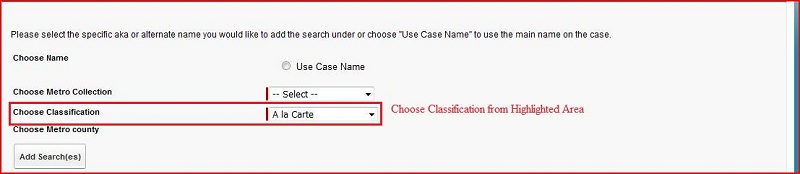
Working of Choose Classification:
- In this case AddSearch Controller contain the method Name: getClassification
- We have created the SelectOptions type List
- Add the
A la Carte, Package, US Criminal Re-Verify
in the List
- Call this method in the
selectOptions
under the
selectList
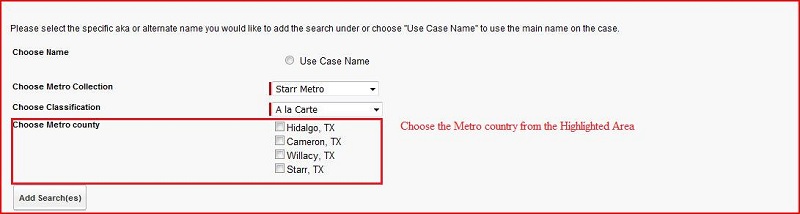
Working of Choose Metro County:
- We can't choose the more than one county at a time. If we try to choose more then one county at a time then error message is throw:
More than two searches cannot be Added at one time.
Working of AddSearch Controller: createCommaSeperatedList Method
- In this method we have created the temporary Set Type String
- Add the Values in the Set based on the sSelectMetroType
Working of AddSearch Controller: updateCaseCountyCollection Method
- In this method we have write the Query on the PreEmploy_Case__c Object
- Get the SELECT ID, RelatedCounty__c, RelatedMetroCollection__c from the PreEmploy_Case__c Object based on the sCaseID
- Then we have stored the RelatedCounty__c in the temporary variable
- And also stored the RelatedMetroCollection__c value in variable.
- Then we have display the RelatedCounty__c, RelatedMetroCollection__c along with comma separator on the PreEmploy_Case__c Interface.