Case Close: Logic Help for Developers
For Non-Graded Clients (Graded_Client__c DOES NOT CONTAINS "Yes")
Criteria 1) Are all searches closed?
-
All Searches within the case must have Background_Search.Search_Complete__c = TRUE.
-
If all searches are not complete it should not attempt to close at all.
-
A new field on the case "isallsearchesclosed" needs to be updated to use this logic.
Criteria 2) what status should I put the case in?
-
If all searches within the case are complete, then the case can be closed.
The status is determined based on the searches within the case.
-
If at least 1 search within the case has a Status_Standard__c of "hit",
"unverified hit" or "Review needed" the status of the case will be "Complete - Review needed".
-
If no searches within the case contain a search with a Status_Standard__c of "hit",
"Unverified hit" or "review needed" and at least one search is "Clear" for Status_Standard__c - then
the case can be closed as "Complete - All Results Clear".
-
If no searches within the case contain a search with a Status_Standard__c of "hit",
"Unverified hit" or "review needed" and at least one search is "Complete" for Status_Standard__c and none are
"Clear"- then the case can be closed as "Complete".
-
If all searches are in the Status_Standard__c of "Cancelled/Not Requested" then the case
can be closed as "Cancelled - Per Client Request".
For Non-Graded Clients (Graded_Client__c DOES NOT "Yes")
Criteria 1) Are all searches closed?
-
All Searches within the case must have Background_Search.Search_Complete__c = TRUE.
-
If all searches are not complete it should not attempt to close or queue for grading at all.
-
A new field on the case "isallsearchesclosed" needs to be updated to use this logic.
Criteria 2) what status should I put the case in?
-
If all searches within the case are complete, then the case can be sent to grading or
if enabled and meets criteria, automatically graded. The status is determined based on the searches within the case.
-
If at least 1 search within the case has a Status_Standard__c of "hit", "unverified hit" or
"Review needed" the case will be queued for grading.
-
If no searches within the case contain a search with a Status_Standard__c of "hit",
"Unverified hit" or "review needed" and at least one search is "Clear" for Status_Standard__c and the
client approves automatic pass, then the case is automatically passed (See Automatic Pass Grading).
-
If neither of those is true - then the case is sent to grading.
Grading details and related objects
Account Settings - Object is BGC_Configuration__c
| Field |
Use |
| Enabled: Grading |
When checked indicates that this is a grading client. |
| Enabled: Grading for Audit |
When checked indicates that this client is set to grading only for audit purposes. |
| Grading: Pass Verbiage |
The special verbiage the client wants when a case is marked as "Pass". |
| Grading: Fail Verbiage |
The special verbiage the client wants when a case is marked as "Fail". |
| Grading: Marginal Verbiage |
The special verbiage the client wants when a case is marked as "Marginal". |
| Grading - Do Not Auto Clear |
If checked, indicates the client does not allow for cases to be automatically "Passed"
even if it meets the criteria. |
Record Types: PreEmploy_Case__c
| Value |
Use |
| Pending Grading |
This record type indicates that the searches have been complete but the case is pending grading. |
| Graded Clear/Pass |
This record type indicates that the case has been successfully graded as a pass or clear. |
| Graded Hit/Fail |
This record type indicates that the case has been successfully graded as a hit or fail. |
| Graded Marginal |
This record type indicates that the case has been set to the marginal grade. |
Case Fields - Object is PreEmploy_Case__c
| Field |
Use |
| Graded Client |
This is a formula field that will indicate if the client is graded or not. If the client is graded this will read "Yes - Graded". |
| Grading Completed By |
This is a lookup to the users table which will track who graded the case. |
| Queue for Grading |
When TRUE indicates that this case has been queued to go to grading, indicating that all searches are done. |
| Grading Complete |
When TRUE indicates that grading has been completed. |
| Report_Case_Status__c |
This is the standard Case Status field, this should not be affected by grading. |
| Report_Case_Grade__c |
This is a separate field from the normal case status and indicates how the case was graded using the
client special grading verbiage (Graded Status Verbiage). |
| Grading Details |
Text area to include any special details regarding this case grade. |
| Grading Status Verbiage |
This is a formula field that will pull the special client grading verbiage from the BGC Configuration based on
the Record Type. |
Grading details and related objects
If a case meets the criteria to queue for grading:
-
Report_Case_Status__c set to "Searches Complete - Pending Grading".
-
RecordType set to Pending Grading.
-
Grading Complete set to FALSE.
-
Report_Case_Closed__c set to FALSE.
-
Queue_For_Grading__c set to TRUE.
Automatic Pass Grading
Some cases do not need to be reviewed and if they meet the criteria for automatic pass grading.
First the system checks to see if the client allows automatic pass.
-
BGC_Configuration__.Grading_Do_Not_Auto_Clear__c = FALSE.
-
If not, then the case is queued for grading. But if so, then the case will automatically be graded as a pass
-
The automatic pass should function the same as the "Grade as Pass" button :
https://cs45.salesforce.com/00b80000001Hemf?type=01I80000000apz9&setupid=CustomObjects&retURL=%2F01I80000000apz9%3Fsetupid%3DCustomObjects
Case close on "Grading As Pass" JavaScript Button.
We can close the case on pressing the "Grading As Pass" JavaScript button on background check page layout.
Criteria for "Grading As Pass" javaScript button to close the Case.
-
All the searches must be completed.
-
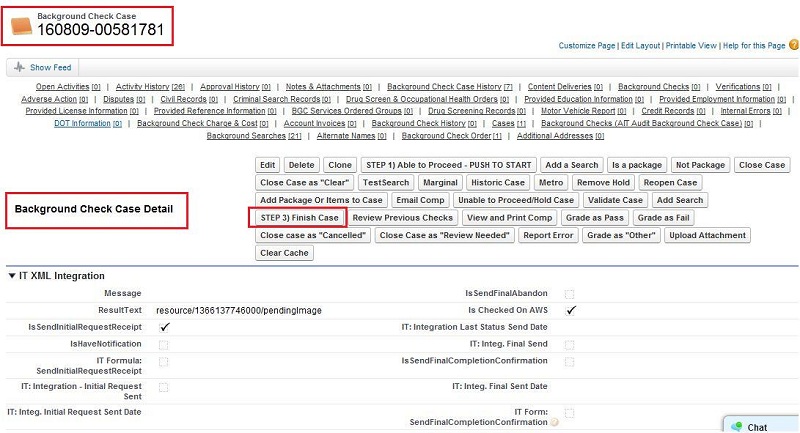
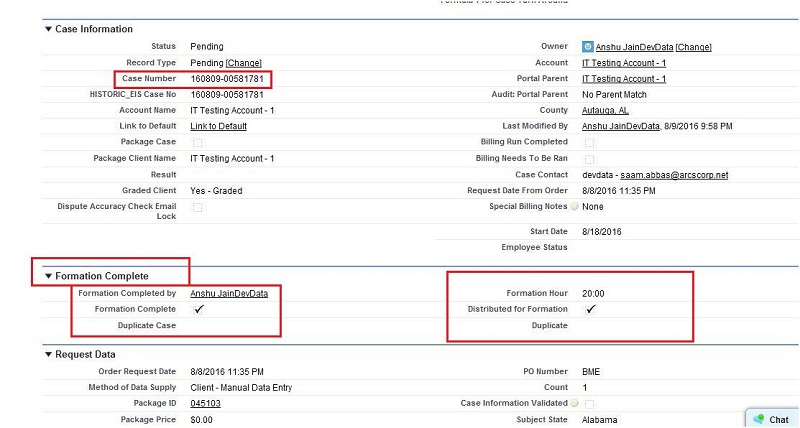
Formation complete checkbox must be checked.(Press "Step 3)Finish Case" Button on
background check page to checked Formation complete checkbox).
-
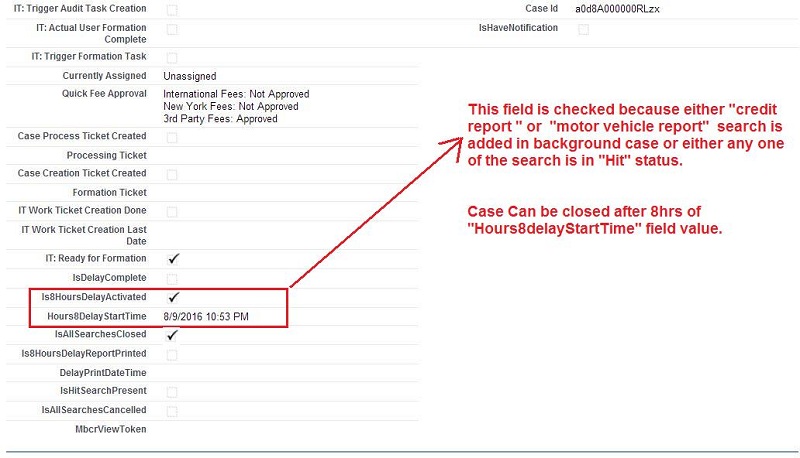
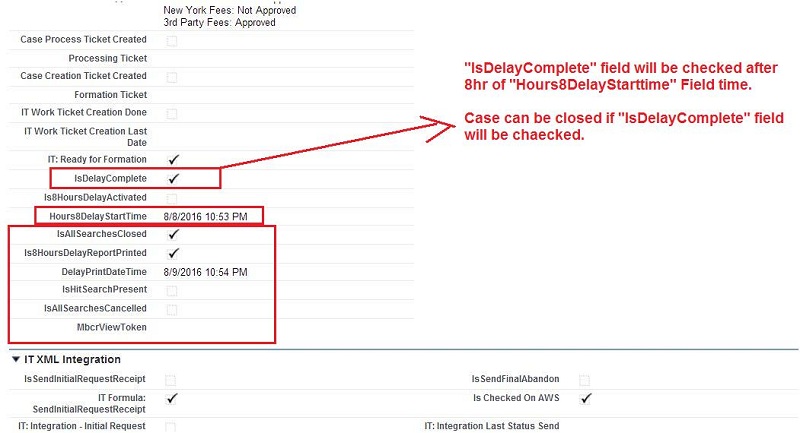
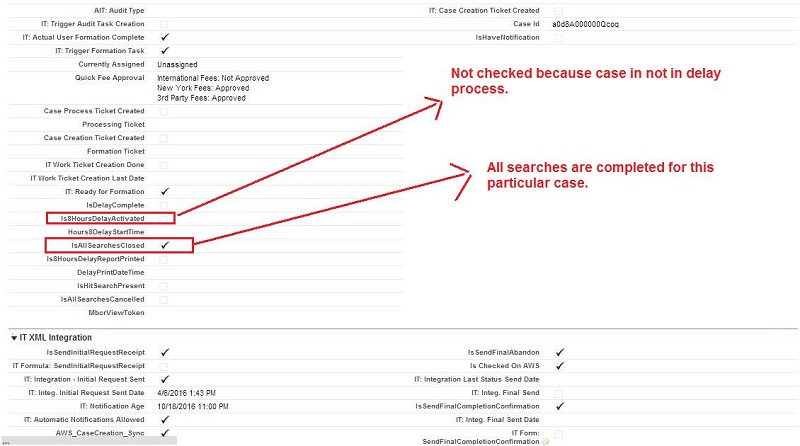
On background check case if "Is8HoursDelayActivated" field is checked then, "Grading As Pass" button checks whether "IsDelayComplete" checkbox is checked or not. If it is checked then, case will be closed and Grading value will be updated. Please check the Below SS for Status of case after "Grading As Pass" button.
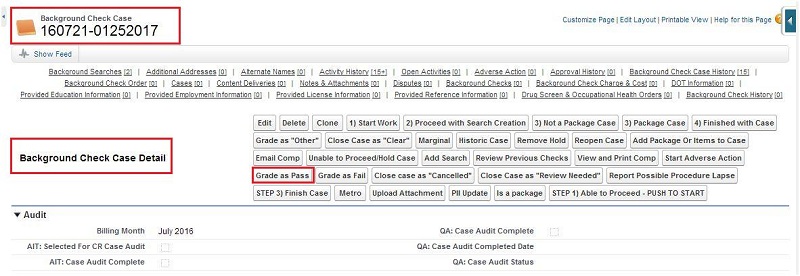
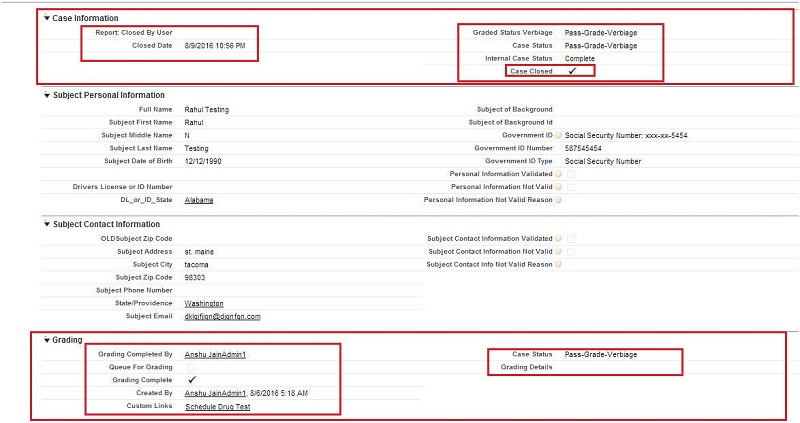
-
Note : If Background check case "Is8HoursDelayActivated" is not checked than
after pressing the "Grading As Pass" button background check case will be closed directly with "Complete" status.
Case close on "Grading As Fail" JavaScript Button
We can close the case on pressing the "Grading As Fail" JavaScript button on background check page layout.
Criteria for "Grading As Pass" javaScript button to close the Case.
-
All the searches must be completed.
-
Formation complete checkbox must be checked.(Press "Step 3)Finish Case" Button on
background check page to checked Formation complete checkbox).
-
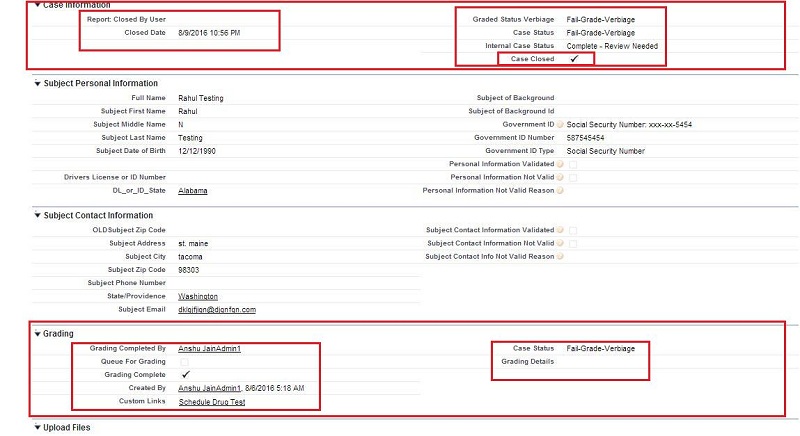
On background check case if "Is8HoursDelayActivated" field is checked then, "Grading As Fail" button checks whether "IsDelayComplete" checkbox is checked or not. If it is checked then, case will be closed and
Grading value will be updated. Please check the Below SS for status of case after "Grading As Fail" button.
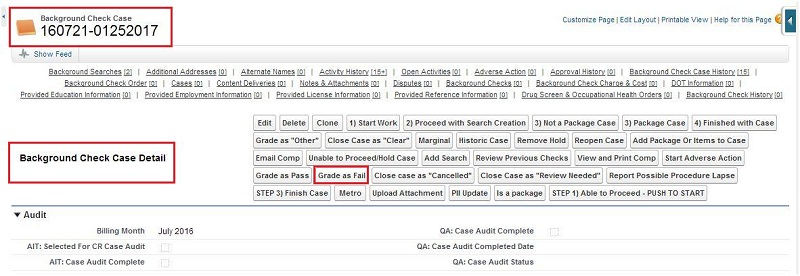
-
Note : On Background check case "Is8HoursDelayActivated" is not checked than
after pressing the "Grading As Fail" button background check case will be closed directly with "Complete-Review Needed" status.
Misc Notes
-
Reopen Case :
When a case is reopened (Either manually or because a search has been added) the grading fields are cleared out,
this will ensure that when the case is closed again it is sent to grading to be re-graded.
-
Comprehensive Report Notifications :
The comprehensive report notifications will trigger grading specific emails for graded clients to ensure their verbiage is
correct.
-
Page Layout :
Graded clients have a separate page layout for the case that displays their graded status instead of the normal status.