Technical Overview of comprehensive report apex class Compreport_2
About Comprehensive Report
Comprehensive report is a full overview report of a background check of an applicant.
It contains the data from preemploy Case object, background Search object, verification object, Intake objects,
alternate name and additional address object and BGC Order object.
Detailed Technical Document :
Compreport_2 Apex Class constructor:
Working of the CompReport_2 (constructor)
- CompReport_2() is a constructor of Compreport_2 apex class. It uses "ApexPages.StandardController controller" as a parameter.
We have taken "record" as PreEmploy_Case__c variable and value of sCaseId and bIsPrint variable we are getting from current page parameter and sCurrentDate variable
is the current time of the system in format('EEEEE, MMMMM dd, yyyy HH:mm a').
-
About sCaseId, bIsPrint, sCurrentDate variable and it's uses :
sCaseId :
sCaseId is a Id type of variable. It will store the current page case id of PreEmploy_Case__c object. sCaseId variable will take the Pre employ Case ID form apex current
page parameter after calling : ApexPages.currentPage().getParameters().get('id'). Although sCaseId is used many times in the comp_report_2 class but important use of
this variable is that we are passing as a parameter in the BindSearch() method and if sCaseId is not null or blank then only BindSearch() will execute further and
send data to comp report page from pre employ case object.
bIsPrint :
It is a boolean type of field which store true or false. It will take the value from the apex current page parameter after calling
: ApexPages.currentPage().getParameters().get('sPrint')== 'Yes' ? true : false. If the current page parameter return the value yes then
bIsPrint variable will become true otherwise false. This variable will be used inside constructor only to make bCaseDelay variable true. If bIsPrint is not true then bCaseDelay
variable will become true.
sCurrentDate :
It will store the current system time. This field is use to show the date and time on comprehensive report on which that pdf comprehensive report is created.
Format to show the date and time field is : "EEEEE, MMMMM dd, yyyy HH:mm a".
- After getting all the above variable value we are getting the value of "getId "variable. getId is a string type of variable which will take the id of the system current page
after calling : System.currentPagereference().getParameters().get('id');
- Now script checks that if getId is not equals to null and if scripts returns true then :
Query is written on the PreEmploy_Case__c Object
to get Id, Record Type Id, Full Name, Subject Address, Subject City, Subject State,
Subject Zip Code, PO Number, Account Name, Name, Package Name, Case Turn Around, CompBreak,
Client_Status, Client Case Status, Report Closed Date, Formation Order Request Date, Subject First Name,
DL or ID Number, Subject Middle Name, DL ID State, Account, Subject Last Name, Government ID,
Government ID number, Subject Email, Subject Phone Number, Subject Date of Birth, Subject of background,
Subject Mask Date of Birth, Subject Country formula, Internal Notes, Order Number name,
DL Number. And return value of the above query will be stored in the "record" variable. Record is a PreEmploy_Case__c object variable.
- After that script checks that "record.Id" is not equal to null and if scripts return true then in the variable "soql" we are storing the
query. "soql" in a string type of variable.
- Now get the id, ContactID, profile.name and Name from the logged user and store in the "listuser" variable.
Now scripts check for "listuser" size is greater than Zero and if scripts returns true then in sContactID variable store the contactId the current logged user.
Now again scripts checks that ContactID is not equals to null or blank and user is not null and if this scripts return true then "Get AccountID from Contact" and if AccountID
found on that contact then that AccountID of contact will be assign to sAccountID variable. Ans this sAccountID is a current loged user id.
- After that scripts check for "listuser" size is greater than Zero and Profile Name is 'MVR Only Profile' or '2014PE Customer Portal - Client MVR Only Profile'
and if scripts return true then in the "soql" string variable we are adding Status_Standard__c is not equal to "Cancelled/Not Requested" and Search_Type_Name__c is not equal to
"motor vehicle report". And if script check for Profile Name and if scripts return false then same soql variable query we are adding Status_Standard__c is not equal to "Cancelled/Not Requested" and Search_Type_Name__c is not equal to "SSN Address Locator" or "credit report".
- After that find Alternate Name related to background check case.
- Then write the Query on the Alternate_Names__c Object and get Id, Alternate first name, Alternate Middle name, Alternate last name,
Alternate DOB , record type and subject name.
- After that find Additional Address related to background check case.
- Write the Query on the Additional_Address__c Object and based on that soql query get the ID, Name, Address, City, State, Providence name,
Date of residence, Zip code and type of address.
- After scripts checks that size of additional address is greater than Zero and additional address in not equal to null and if this scripts
return true then value of ArchivedAdditionalAddressWScl.AdditionalAddress object field sAddress, sCity, sStateProvidenceName, dDateOfResidence,
sZipCode, sTypeofAddress will store the Additional_Address__c object field value.
- Now Query is written on Background_Search__c object to get Id, Status Standard, Client Search Status, Search Closed Date and Notes Pre to Client
where case id is equals to current record case id and search type 'SSN Address Locator' AND PreEmploy_Case__c is not null. And store this list value in
"LstSSNAddrLocatorSearches" variable which is of Background_Search__c type.
- Then scripts checks that "LstSSNAddrLocatorSearches" size is greater than Zero or not and if scripts return true then
Background_Search__c object variable "oSSNAddrLocatorSearch" will store the LstSSNAddrLocatorSearches.get(0) value.
sSearchStatus variable will store the oSSNAddrLocatorSearch.Client_Search_Status__c value and sSearchClosedDate variable will store the
return value of ChecknullDate() method and in checknullDate method we are passing "oSSNAddrLocatorSearch.Search_Closed_Date__c" as parameter.
ChecknullDate() method will be described later in this document.
- After that we are calling BindSearch() method and in the parameter we are passing the Id of current record. BindSearch() method will be
discussed later in this document.
- Now we are initializing bCaseDelay variable to false. bCaseDelay is a boolean type of field which will be true if case delay for any pre employ case.
Now Query is written on the PreEmploy_Case__c object to get Id of current case record and report case closed status should be false.
lstBGS is a PreEmploy_Case__c object variable which will store the id return by above query. Then scripts checks that the size of lstBGS is greater than
zero or not and bIsPrint is not true and if both scripts return true then bCaseDelay will be true. bCaseDelay field value will be used in the
"comp_report_2" and "comp_report_3" visual force page and if any "hit" search status found in the case id that case delay field on PreEmploy_Case__c will be checked.
Compreport_2 Apex Class Methods:
Working of isClientPortal()
- It is boolean method. In this method we are initializing the variable "bIsPortal equals to true".
- After initializing the bIsPortal we are calling "Salesforcecl.IsSandboxInternal() or Salesforcecl.IsProductionInternal()"
method in the Script.
- And if, above scripts is true then bIsPortal will become false. isClientPortal() Method will always return the bIsPortal variable value. To call ResultAndDetails method
in the BindSearch() method we are passing this as a parameter. "oCompReportWS.ResultAndDetails(sCaseId, sUserId, isClientPortal)"
Working of bIsNoDetailProfile()
- This is a boolean method which is used to check profile name : 2014PE Customer Portal - Client NO DETAIL'.
- In this method initially we have assign variable "bProfile equals to false".
- Then query is written on USER object to get id, Profile.Name, Name for currently logged user and store in the "listuser" variable (User type variable)
- Now scripts checks that profile name : 2014PE Customer Portal - Client NO DETAIL'. And if scripts return true then "bProfile" variable will be
True. bIsNoDetailProfile method will always return the bProfile variable value either true or false.
- This method is used in CompReport_NoDetail page.
Working of autorun()
- This is a autorun method and it will run on the page load.
In this method we are getting time zone : "UserInfo.getTimeZone()" and current time of the that zone in millisecond: "getOffset(System.now()))/(1000*60*60)".
- Now scripts check for record is not null and if scripts true then from query get UserType from profile where UserType is equal to 'CSPLitePortal' and id is current logged account.
And if the UserType is available then id of record will be assigned to background check history object and we can see the record in Background Check History object on pre-employ case layout.
- oTrack.Background_Check_Case__c = record.Id where oTrack is a Background Check History object.
-
"Tracking record is only for portal users".
Working of BindSearch()
- In the BindSearch() Method we are passing PreEmploy Case Id(sCaseId) as a parameter to fetch the data search and verification object data based on it.
- Scripts check that case id is not null or not blank, and if scripts return true then create a query and store in a string variable "soql" :
Query : Get "id, Search Type Name, Concat Name, name, Search Request Date, SearchType.Location_Based, Jurisdiction Name, Classification, Search Closed Date,
Notes Pre to Client, Status Standard, Client Search Status, Report Case Closed from from background search
where search type name is not equal to null or 'SSN Address Locator' and 'credit report' and status standard is not equal to
'Cancelled/Not Requested'".
-
Now create a list on User object :
Get Id, Profile Name, Name From User object where id is equals to current id and store this value in a variable "listuser".
- Scripts checks that "listuser" size is greater than Zero and "Profile Name is equals to 'MVR Only Profile' or
'2014PE Customer Portal - Client MVR Only Profile'" and if scripts return true then :
Search Type Name 'motor vehicle report' will be added in the query which is store in the "soql" variable. And if the "listuser" size is
less than Zero Search Type Name 'Statewide Research' will be removed from "soql" variable.
- Call NestedSearchDetailsListcl class in For loop. When For loop is used for background search and declare object with associated
class and check "ChecknullString(BGS.Service_Classification__c).equalsIgnoreCase('verification'))" condition. If script checks and if it is true, then
: Get "Notes To Client" from "Verification".
- And If lstVerification in not null and lstVerification is not Empty Then Te.sVerification = ChecknullString(oVer.Notes_To_CLient__c),
Where Te is NestedSearchDetailsListcl class Object.
- In the BindSearch() Method based on the different Search Type Name(Search_Type_Name__c) and the status of the case we are storing the value in the table
of Comprehensive Report. We are checking for all the Search_Type_Name__c, the status of the case and based on the script value we are sending the pre employ case
data to comp report pdf page.
Working of ChecknullString()
- In this method we have passed "string sVal" as a parameter and if sVal is Null then this method will initialize sVal to blank otherwise
this method will return sVal value.
- This method is mainly used in BindSearch() Method. This method is used to show the pre employ case data to comp report pdf table.
Working of ChecknullDate()
- In this method we have passed "date dDate" as a parameter and if dDate is Null then this method will initialize sdate equals to dDate.format() where
sdate is a string type of variable. And if dDate is null then method will return sdate. This method is also use to set the value of all the date field
on in the comp report.
- This method mainly used in BindSearch() Method. This method is use to set the value of all the date field on the comp report in the date format.
"View and Print Comp" button Functionality
- Compreport_2(View and Print Comp) is custom button on the Background Check Case (PreEmploy_Case__c). This button is used to run Compreport_2 apex class
and generate a pdf report for the user.
- For Compreport_2(View and Print Comp) button:
Go to Setup ----> All Tabs ----> Background Check Case ----> Click on the Case Link ---> Click on the "View and Print Comp" button
Please see the below screen shot for Compreport_2(View and Print Comp) button.
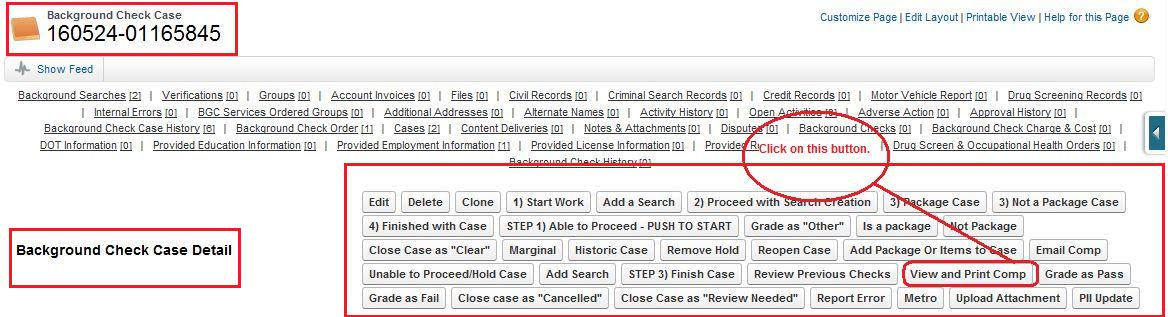
- Whenever we click on the "View and Print Comp" button on the background check case page it will redirect to new window where a pdf
report of the user will be available. Pdf report contains the information about user and it's background order(all background searches) information.
- If we have clicked on "View and Print Comp" button but we are unable to view visualforce page and Apex class on the comp report page
then we have to follow the given steps:
- Go to Setup ----> Personal information (Under the My Personal Information Under the Personal Setup)---->
Click on the Edit Button ----> Checked the Development Mode ----> Click on the Save button.
Working of Compreport_2(View and Print Comp) button on Background Check Case:
How to reach Compreport_2(View and Print Comp) button?
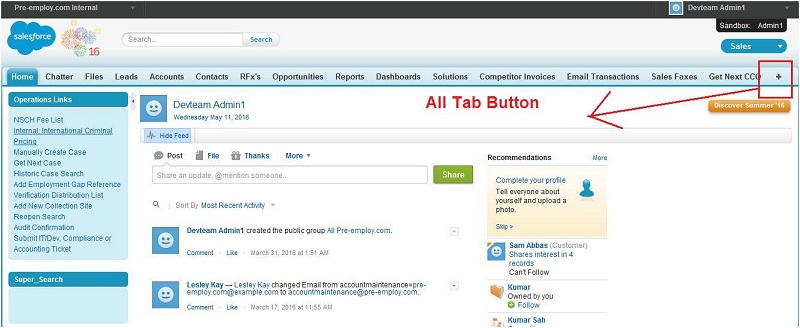
Step 1 : Click on all tab on the home page of salesforce.
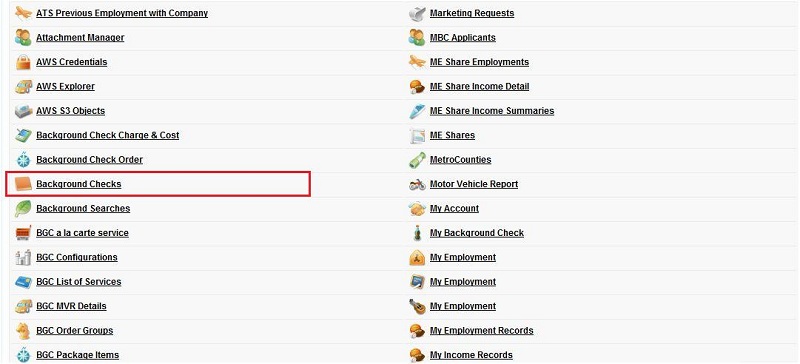
Step 2 : Search for background checks and click on background check case object.
Step 3 : Click on any background checks.
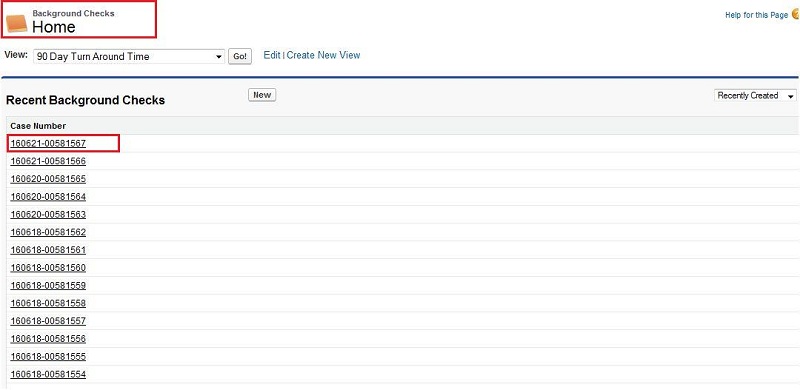
Step 4 : On background checks layout, we can see the Compreport_2(View and Print Comp) button.