2. Create Ticket
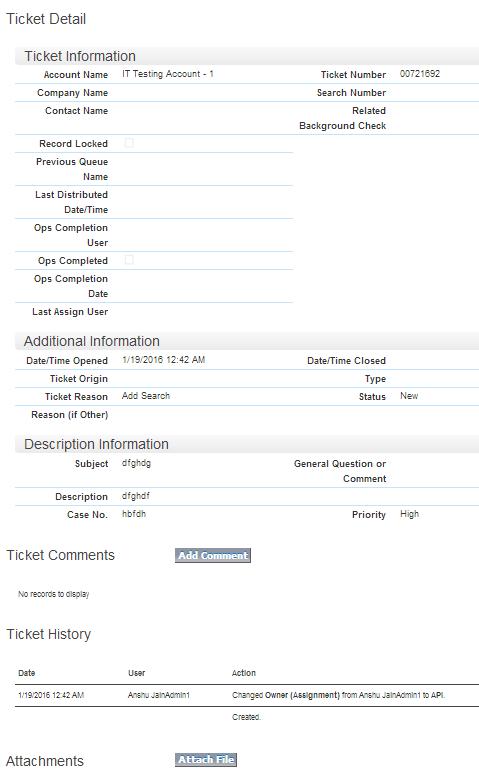
In client portal ticket creation is done using iframe of dot net page. The ticket when created, it create a record in Case object.
There are few links on the client portal that create tickets the process is same but the Ticket Reason field will display different value according to the link clicked.
Following Links of Request Types are:
- Request Additional Services: This link is on Homepage as well as on the left Navigation menu.
- Submit Additional Information: This link is on the left Navigation menu.
- Begin Adverse Action: This link is on the left Navigation menu.
- Ask Us a Question: This link is on Homepage as well as on the left Navigation menu.
- Help Me: This is a button on Background Case detail page.
- New Ticket: This button is on Open/Pending Ticket page
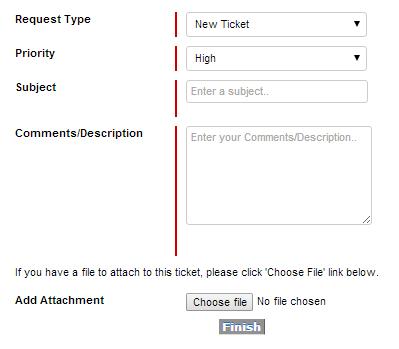
When user clicks, it prompts the user to provide enough information for any of their requests, if a specific topic was the link they clicked on (e.g. Begin Adverse Action) then that should be selected by default and fill the following details:
- Request Type (using same values as current page)
- Priority (High, Medium, Low)
- Comments/Description
- Add Attachment
Following are the default fields will be prompted to create ticket:
Special Considerations of fields..
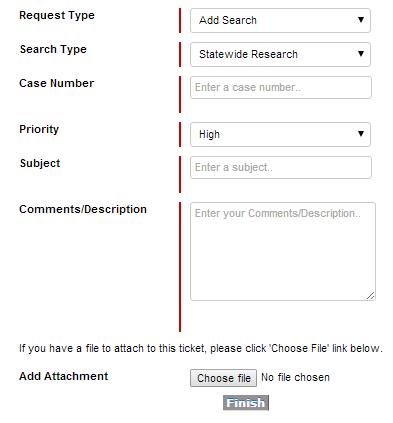
Some request types should open additional fields so that more information can be prompted.
- Add Search
o The search type, using our list of services.
o The case number
- Possible Missed Record
o The search and/or case number
- Cancel
o The Search and/or Case number
- Rush
o The search and/or case number
- Status/ETA
o The search and/or case number
- Start Adverse Action
o The case number
For eg:
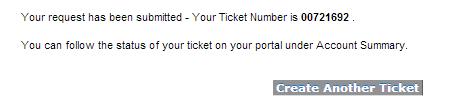
When ticket is created then a record is created in Case object, in that record following fields will be updated by defult: - User email (webmail)
- Status = New
- Topic = Ticket Reason and Ticket Subject
- Ticket Record Type = Standard Ticket
- Priority = Priority field
- Comments/Description = Description
- Attachments attached to the ticket/case
- Account on user attached
- User information filled out in appropriate Requestor Information Fields
- First Name
- Last Name
- Phone
- Email